Most of us learned to use AI the same way: type a request, read what comes back, accept it or try again.
The research points somewhere else, though, and it has become unusually specific. The quality of what you get back depends far less on how you word the request than on what the model can see while it answers, and on whether you check the result.
Here are ten things the evidence supports.
The gap between feeling fast and being fast
Start with the most uncomfortable finding. In 2025, METR ran a randomized controlled trial with sixteen experienced open-source developers across 246 real tasks in mature repositories. Half the tasks allowed AI tools, half did not.
Developers using AI took 19 percent longer. They had expected to be 24 percent faster, and afterwards still believed they had been about 20 percent faster. (METR.)
It is one study, with sixteen people, on early-2025 tools, and METR now describes the result as historical. It does not show that AI never helps. What it does show is that the feeling of speed is not evidence of speed, which is worth sitting with before trusting your own impression of how well this is going.
The ten
- Stop one-shotting. One request, one answer, accept or discard. This is the default behavior and the root of most bad output. Treat the first response as a draft that tells you whether you asked the right question, then say what is wrong with it. The useful work usually happens on the second and third pass.
- Curate the context instead of stuffing it. The instinct when an answer drifts is to paste in more. The research says that backfires. Chroma tested eighteen frontier models and found all of them got less reliable as input grew, even with the task held identical. In a separate benchmark, GPT-4o scored 99.3 percent on a short context and 56 percent at 128,000 tokens. (Chroma, NoLiMa.) Send the section that matters, not the whole document. I wrote about this at length in context rot.
- Start a fresh session when things drift. Bad context compounds. Once a wrong assumption is in the conversation, the model keeps referring back to it, and no amount of correction fully removes it. Starting again with a clean summary of where you actually are is faster than arguing with a polluted thread.
- Keep your working material outside the conversation. This is the one that changes your day rather than your prompt. If the only copy of a screenshot, a link, or a decision lives in a chat thread, then starting fresh means losing it, so you avoid starting fresh. Keep that material somewhere you can reach regardless of which session, app, or tool you are in, and a clean restart costs you nothing.
- Decide how you will check it before you generate. Most people skip this. Pick the test first: the thing that would prove the output is right. For code that is a linter, a type checker, a test suite. For writing it is a fact you can verify or a constraint you can measure. Checking against a standard you set in advance is very different from reading it over and feeling satisfied.
- Use the smallest model that does the job. Frontier models cost roughly ten to twenty times more than mid-tier ones, and a lot of everyday work does not need them. Route the hard reasoning to the big model and let a smaller one handle the summarizing, extracting, and reformatting. Worth revisiting whenever a new mid-tier model ships, because today’s mid-tier is roughly last year’s frontier.
- Give it fewer tools, not more words. If you are building with AI, a bloated tool set creates ambiguity rather than capability. In my own use, choices get noticeably worse once there are more than about twenty tools to pick from. A small, clearly distinct set beats a large overlapping one.
- Cache the parts that never change. If you are calling an API, put your system prompt, tools, and examples first and keep them byte-identical between calls. Anthropic discounts cached input by up to 90 percent, and OpenAI by at least half. A timestamp or session ID at the top of the prompt silently invalidates the whole thing. (Anthropic.)
- Split big jobs so each part keeps its own clean context. Rather than one conversation that accumulates everything, let separate passes each do their own exploring and hand back a short summary. The coordinating thread stays readable, which is the whole point.
- Batch whatever nobody is waiting on. Overnight summarizing, classification, bulk enrichment, evaluation runs. Both major providers discount asynchronous batch work by about half. There is no reason to pay interactive prices for work no human is watching.
Why this matters beyond your own output
Unverified AI output has a name now. Researchers at BetterUp Labs and Stanford’s Social Media Lab call it workslop: work that looks finished but lacks the substance to move the task forward. In their survey of 1,150 desk workers, 40 percent had received some in the previous month, and each instance cost the recipient close to two hours. They put the figure at about $186 per employee per month. (Harvard Business Review.)
That number is an extrapolation from self-reported time, so treat it as directional rather than precise. The mechanism is the part worth taking seriously: unchecked output does not disappear, it moves the work onto somebody else.
The through line
Every item above is a version of the same idea. Models degrade when their context is cluttered. People lose hours the same way, moving between apps and tabs and rebuilding what they already had a moment ago.
The discipline is identical in both cases: capture what matters, keep it close, throw out the rest, and start clean when things get muddy. The model’s side of that has a name, context engineering, and a body of research behind it. Your side of it mostly does not, which is strange, because you are the one deciding what the model sees.
Where Tansei fits
Tip four is the reason I built Tansei. It is a simple shelf for Mac and Windows that sits at the edge of your screen and holds what you are working with right now: screenshots, links, snippets, files, colors, notes. You drag something on, switch apps, and pick it back up when you need it.
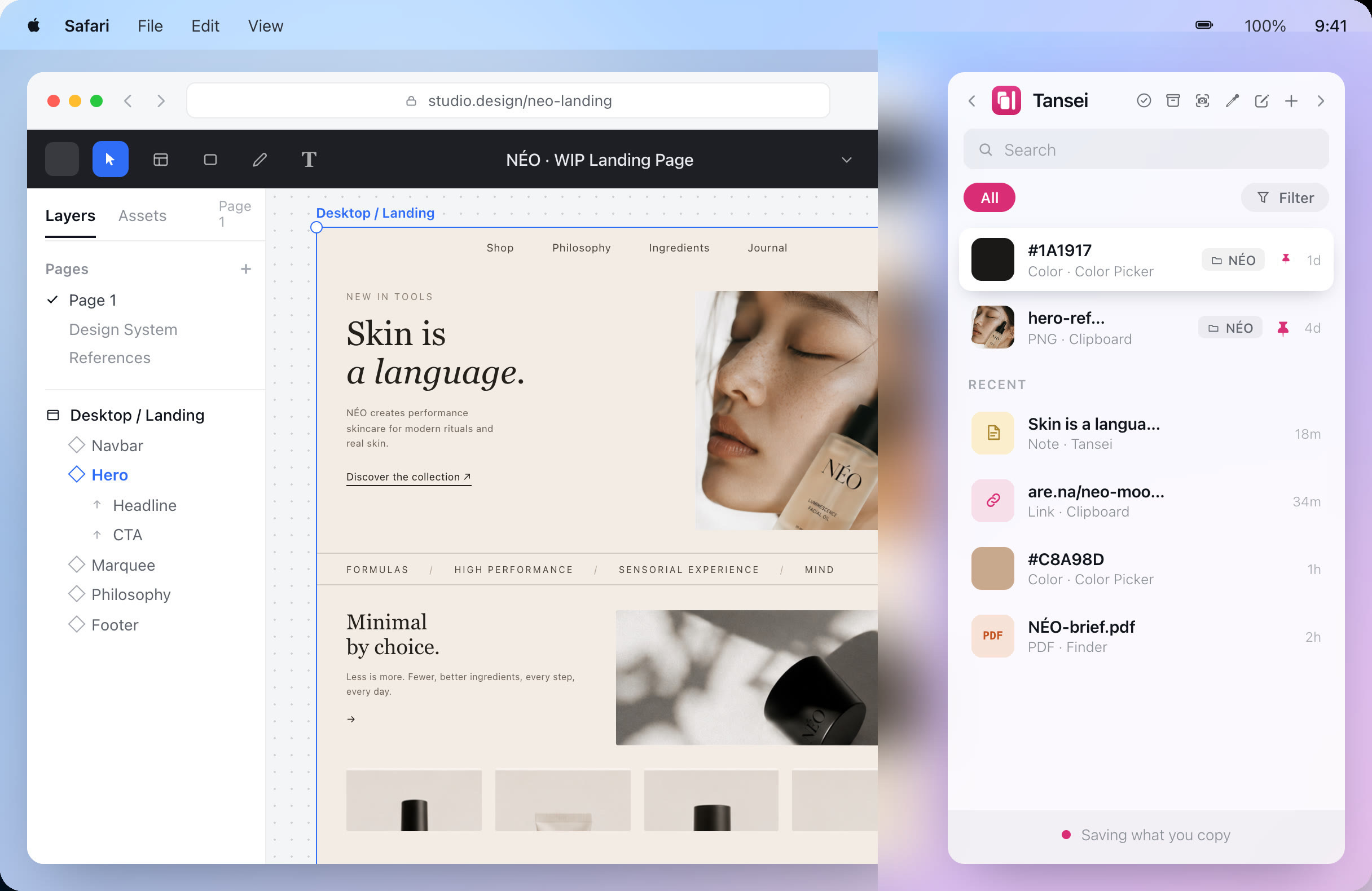
It does not talk to a model, write prompts, or manage anyone’s context window. It holds your side of the work, so closing a drifting conversation and starting a clean one does not cost you the material you had gathered. Everything stays on your computer, and there is no account.
Get Tansei for Mac and Windows
Frequently asked questions
What is the difference between prompt engineering and context engineering?
Prompt engineering is about wording: how you phrase the request. Context engineering is about what the model can see while it answers, which includes the documents, history, tools, and examples in its window. The term was popularized in June 2025 by Tobi Lütke and Andrej Karpathy, and the useful test is whether your improvements come from rewording or from changing what is in the window. Rewording is the smaller lever.
Does a bigger context window mean I can paste in more?
You can fit more in, but that does not mean the model will use all of it well. In the NoLiMa benchmark, 11 of 13 models fell below half their short-context score by 32,000 tokens. A larger context window gives you more room. Useful context can still be much smaller.
Is AI actually making people slower?
It can. A METR study found experienced developers were 19% slower with AI on tasks in codebases they already knew, even though they thought AI had made them faster.
The study only had 16 participants, so it does not tell us that AI makes everyone slower. It does show why perceived time saved is worth checking against the actual result.
What is the fastest way to cut AI costs?
Start with prompt caching if your application sends the same instructions repeatedly. The repeated prefix needs to stay identical for the cache to work.
Then look at where you are using an expensive model for work a cheaper one could handle. If a task does not need an immediate response, batching can cut costs further.
Does Tansei make AI output better?
No. Tansei does not connect to the model or see your prompts.
It gives you somewhere to keep the screenshots, links, files and snippets you are still using, instead of leaving everything inside one long AI conversation. That makes it easier to start a new session and bring across only what it needs.
Back to top